You can build a complete sales funnel in GoHighLevel by creating a funnel inside the Sites tab, adding an opt-in page, a sales or checkout page, and a thank-you page, then wiring your automations and tracking on top. That part takes an afternoon. The harder part, and the reason most funnels quietly underperform, is knowing whether each step is actually converting and whether your ad platforms can even see the sales you make. This guide covers both: how to build the funnel, and how to measure it so you are optimizing for buyers instead of guessing.
What is a sales funnel in GoHighLevel?
A sales funnel in GoHighLevel is a sequence of connected pages that moves a visitor from first click to purchase, built and hosted inside GHL's Sites section. Instead of a full website where people wander, a funnel points at one action per page: opt in, then see the offer, then check out, then land on a confirmation. GoHighLevel gives you the page builder, the forms, the checkout, the CRM, and the automations in one place, which is why agencies run their client offers on it.
A typical funnel has four stages:
- Opt-in or landing page. Captures the lead, often in exchange for a waitlist spot, a discount, or a lead magnet.
- Sales or offer page. Presents the offer and the price.
- Checkout or cart. Takes payment.
- Thank-you page. Confirms the purchase and kicks off follow-up.
Every stage leaks some people. The whole game is understanding how much each one leaks and fixing the worst offender.
GoHighLevel funnel vs. website: which one do you need?
Use a funnel when you want someone to take one specific action, and a website when you want to inform or let people browse. A funnel strips away navigation and choices so attention flows toward a single conversion. A website keeps menus, multiple pages, and open-ended exploration.
Here is how the two compare:
- Goal. A funnel drives one action, such as buy, book, or opt in; a website informs, lets people browse, and builds presence.
- Structure. A funnel is linear with a few pages; a website branches across many.
- Best for. Funnels fit launches, offers, and lead gen; websites fit your brand, blog, and service catalog.
- Navigation. A funnel removes it on purpose; a website keeps a full menu.
For selling a specific offer, a challenge, a course, or a service package, build a funnel. You can still have a website; the funnel just lives beside it for the campaign. GoHighLevel builds both in the same Sites area, so you are not choosing a different tool, only a different layout.
How to build a GoHighLevel funnel step by step
Here is the full build inside GoHighLevel. Screenshots of each screen help readers follow along, so capture them as you go.
- Create the funnel. In the sub-account, open Sites, then Funnels, then New Funnel. Name it after the offer so you can find it later.
- Build the opt-in or landing page. Add your first step and pick a template or a blank page. Keep it to one promise and one form. If you are running a launch, this is where people join the waitlist.
- Build the sales page. Add a step for the offer. State the outcome, the price, and one call to action. Warm traffic from your own list needs less convincing here than cold traffic from ads.
- Add the checkout. Connect your payment provider, either Stripe or the native GHL payments, add the product, and set the price. This is the cart step.
- Build the thank-you page. Confirm the purchase and set expectations for what happens next. This page is also where you fire your purchase conversion event.
- Wire the automations. In Automation, then Workflows, trigger emails and SMS off form submissions and purchases: a welcome sequence for opt-ins, a receipt and onboarding sequence for buyers, and a reminder sequence for people who reached the cart but did not pay.
- Connect your domain and tracking, then test. Add your custom domain, place your tracking (more on this below), and walk through the entire funnel yourself with a real test purchase before you send a single visitor.
That is a working funnel. Most guides stop here. The next three sections are what separate a funnel that looks done from one that actually makes money.
GoHighLevel funnel templates: start faster
GoHighLevel funnel templates let you import a pre-built funnel and customize it instead of designing every page from scratch. GHL ships a built-in Template Library inside the funnel builder, and there are third-party marketplaces with templates by industry. For a first funnel, a template saves hours because the structure and the conversion basics are already in place.
To use one:
- Open the Template Library in the funnel builder and browse by category, or import a share link from a third-party template.
- Load it into your sub-account, then swap the copy, colors, logo, and offer for your own.
- Check mobile view before publishing. Most traffic is mobile, and templates often need spacing fixes on small screens.
A template gets you live faster, but it does not know your offer or your numbers. Build from scratch when your funnel has an unusual flow, and use a template when it is a standard opt-in, sales page, checkout, thank-you sequence. Either way, the conversion tracking you add next is the same.
High-converting GoHighLevel funnel examples
The three funnels agencies run most on GoHighLevel are the lead-magnet funnel, the waitlist or launch funnel, and the webinar funnel. Each uses the same four stages with a different front end.
- Lead-magnet funnel. Opt-in offers a free resource, then a follow-up sequence sells the paid offer. Good for cold traffic because the first ask is free.
- Waitlist or launch funnel. People join a waitlist, get warmed up, and buy when the offer opens. This is the format behind most big creator launches.
- Webinar funnel. Registration page, live or automated webinar, then an offer at the end. Strong for higher-ticket offers that need explaining.
A launch funnel, reverse-engineered
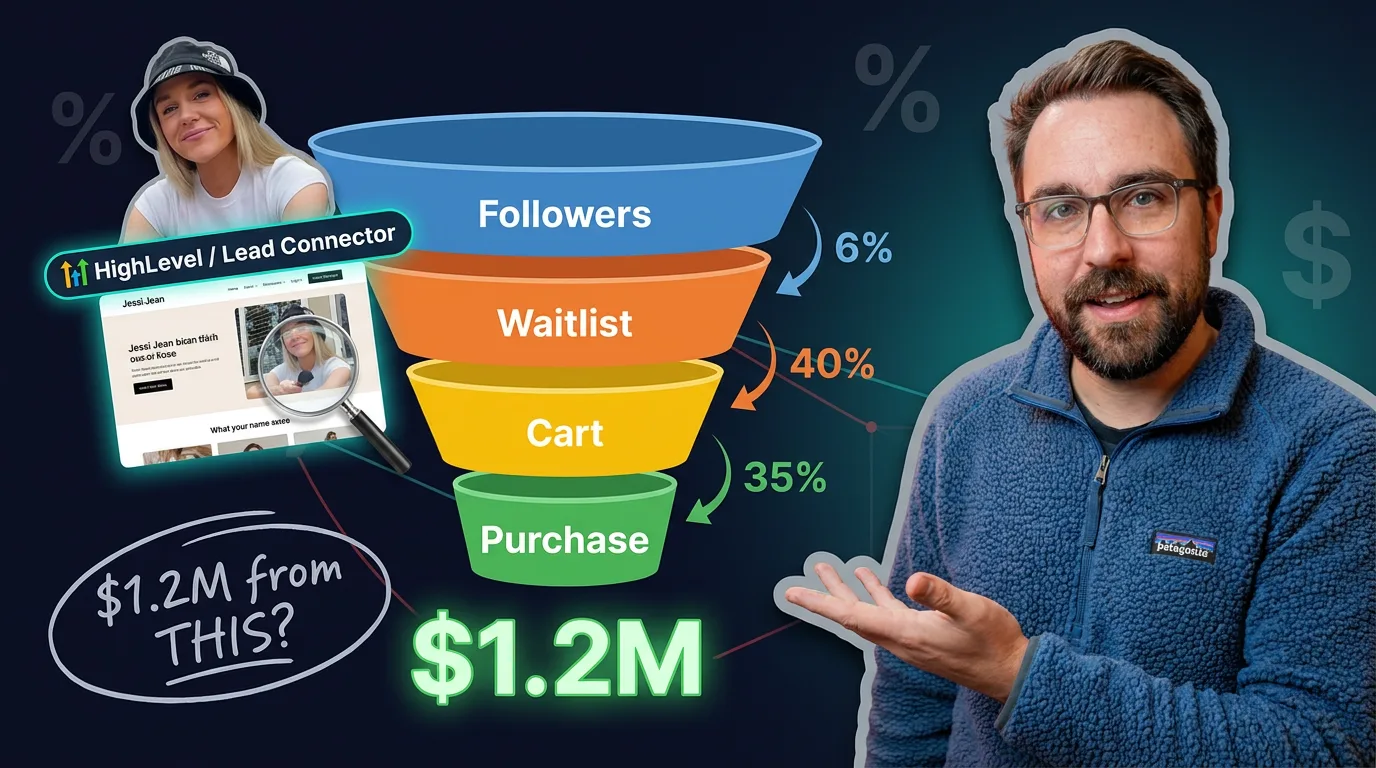
Here is a concrete example, modeled on a real creator launch. Jessi Jean, the creator behind the "Yap" posting challenge, ran a multi-week challenge that teaches people to talk on camera and promoted it to an audience of around 500,000 followers. The numbers below are a model of how a launch like that moves through the stages, not her reported books. Treat them as a way to see the math, not a promise of what you will hit.
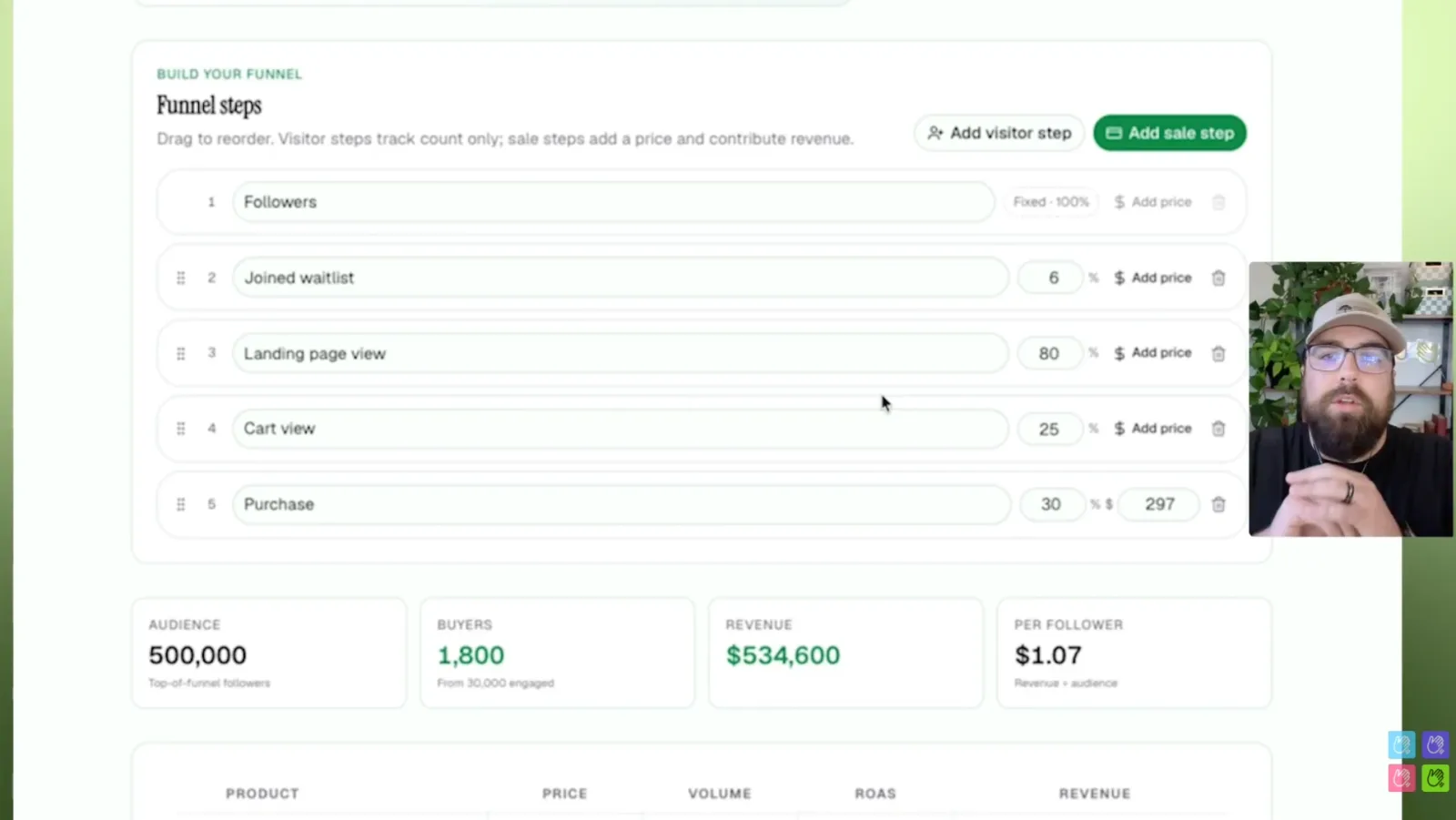
Start conservative. If 6 percent of 500,000 followers join the waitlist, 80 percent of them open the landing page, 25 percent reach the cart, and 30 percent buy a $297 offer, you end up with 1,800 buyers and about $534,600, which is roughly $1.07 in revenue per follower.
Now loosen the assumptions for a very warm audience. Push waitlist joins to 10 percent, then 60 percent to the landing page, 40 percent to the cart, and 35 percent to purchase. That is 50,000 people on the waitlist, 30,000 landing page views, 12,000 carts, and 4,200 buyers. At $297, that is about $1,247,400, or $2.49 per follower.
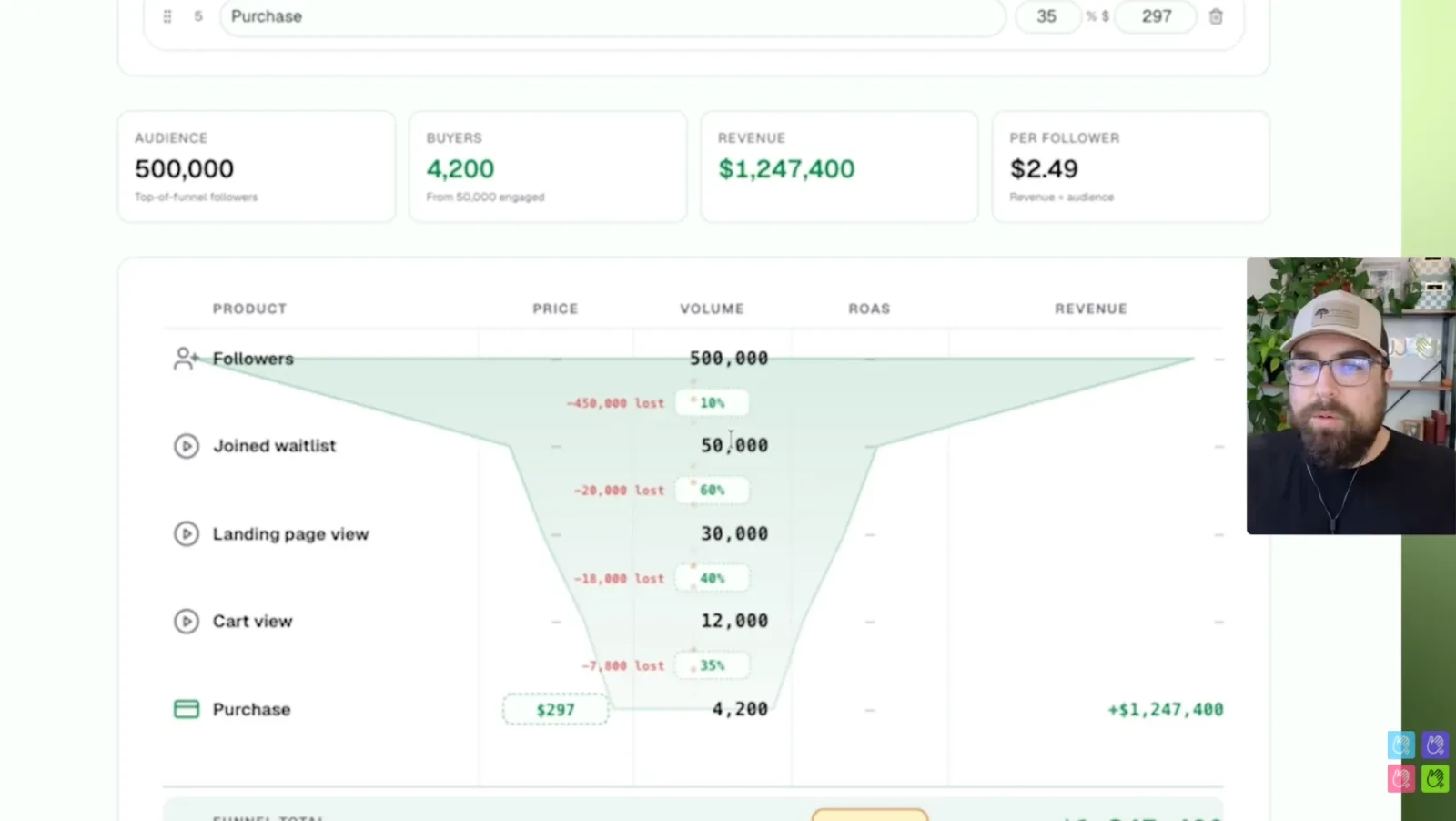
The gap between those two outcomes is not the offer or the audience. Both start from the same 500,000 followers and the same $297 price. The entire difference, more than $700,000, comes from the conversion rate at each step. That is why reading every stage matters more than any single tactic.
The metric worth stealing here is revenue per follower: $1.07 in the first model, $2.49 in the second. It is the fastest way to judge whether an audience actually monetizes or just watches.
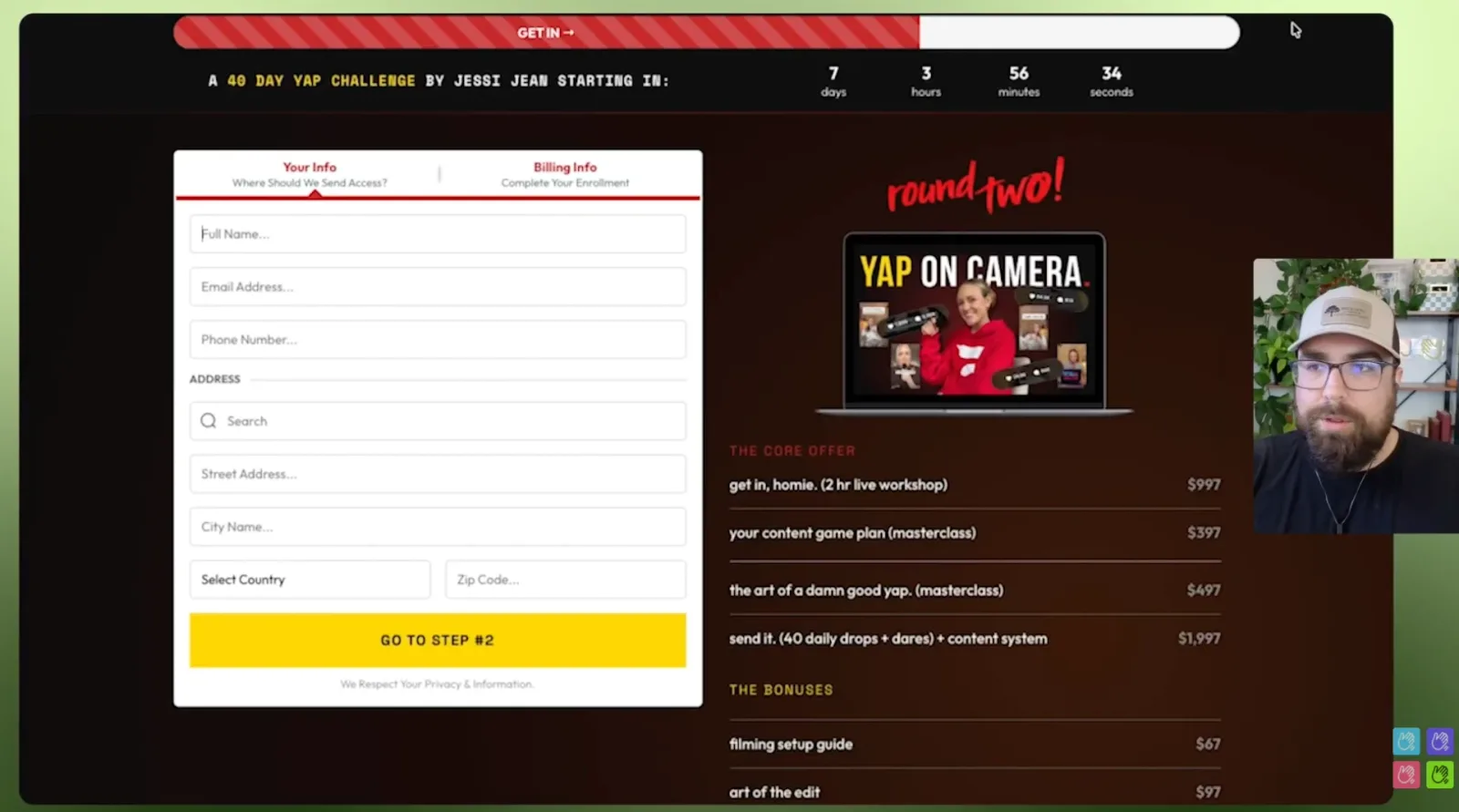
Her real funnel used a two-step checkout: an opt-in for name, email, and phone, then a billing step with a tiered offer stack instead of a single price. Capturing the lead before asking for payment is exactly the structure you rebuild in GoHighLevel, and it is what lets you follow up with everyone who started but did not finish.
The same funnel on paid traffic converts very differently
Now watch what happens when the traffic is cold. Warm list traffic converts far better than paid, so the same structure with ad traffic might look more like: 40 percent from landing to waitlist, 30 percent from waitlist to sales page, 40 percent from sales page to cart, and 10 percent from cart to purchase. At a $297 offer, an early test might spend $5,000 and return $2,800 on the first purchase, which is underwater on the front end. That is normal. Paid funnels usually rely on the follow-up sequence and repeat purchases to turn profitable, and you want to be aiming for roughly two times your ad spend once the backend is counted.
The lesson is not the exact numbers. It is that you cannot manage what you cannot see, and the gap between a 35 percent and a 10 percent cart conversion is the difference between a launch and a loss. Which brings us to measurement.
What conversion rates should a GoHighLevel funnel hit?
There is no single right number, but healthy funnels tend to fall in known ranges, and warm traffic beats cold at every stage. Use these as reference points to find your weakest step, not as targets you are failing to hit:
- Opt-in and landing page: 30 to 60 percent for warm traffic, lower for cold ads.
- Landing to cart: 20 to 40 percent, higher when the audience already knows you.
- Cart to purchase: 10 to 35 percent, with warm launches at the top of that range and cold paid traffic near the bottom.
The single most useful habit is reading the funnel stage by stage instead of looking only at total sales. If 50,000 people join a waitlist but only 30,000 open the landing page, the leak is in your reminder emails, not your offer. If plenty reach the cart but few buy, the problem is price, checkout friction, or trust. GoHighLevel shows you page views and form submissions, but the moment you run ads, those built-in numbers stop telling the whole story. If you are weighing which reporting tool to trust, our GoHighLevel reporting guide walks through the options.
How to track your funnel's conversions (and why GHL's built-in stats fall short)
GoHighLevel's native funnel stats undercount your conversions because ad blockers and iOS privacy limits stop the browser pixel from firing, which can hide up to 40 percent of your real conversions from Meta and Google. When your ad platforms only see a fraction of your buyers, they optimize for cheap clicks instead of actual customers, and your cost per lead drifts the wrong way. This is the part almost every GHL funnel guide skips.
Two things are happening at once inside a funnel:
- Browser-side tracking is the pixel on your pages. It is easy to set up and easy to break. Ad blockers, iOS, and consent tools all cut into it.
- Server-side tracking sends the conversion straight from your system to the ad platform through a server connection, such as Meta's Conversions API (CAPI). It does not depend on the visitor's browser, so it captures the events the pixel misses.
For a GoHighLevel funnel, the fix is to send purchases, leads, and form submissions from GHL to Meta, Google, and TikTok server-side, with enhanced matching (hashed email, phone, and name) so the platforms can attribute more of your sales. Better matching means a higher match rate, and a higher match rate means the algorithm learns from real buyers. For the three ways to connect GoHighLevel to Facebook's Conversions API, ranked, see our guide to tracking GoHighLevel conversions in Facebook Ads.
This is exactly what Hello Conversions does. It connects to GoHighLevel and sends your pipeline events, purchases, and form submissions to Meta CAPI, Google, and TikTok, in a one-click setup that takes about 90 seconds and needs no code. You get real-time logs showing what was sent and what matched, plus a weekly plain-English recap with customer names and revenue so you can see the funnel working. In practice, teams have recovered conversions that were invisible before, pushed their Meta match rate from the mid-8s up to 9.3, and watched cost per lead drop by around 40 percent as the platform started optimizing for buyers. More than 500 GoHighLevel agencies run their tracking this way.
If you are about to put ad spend behind the funnel you just built, connect server-side tracking before you launch, not after you have already paid to learn nothing. You can start a 7-day free trial and have it live in the time it takes to read this section.
Common GoHighLevel funnel mistakes to avoid
Most funnels fail for a short list of reasons, and all of them are fixable:
- Too many steps. Every extra page and field loses people. Ask for the minimum.
- No follow-up automation. The waitlist that never gets reminder emails is the launch that quietly dies. Wire the workflows before you drive traffic.
- Broken or missing tracking. A pixel that stopped firing means you are flying blind and Meta is optimizing badly. Check it and back it with server-side.
- Measuring only the total. Sales alone hide where the funnel leaks. Watch each stage.
- Skipping the test purchase. Always run one real end-to-end purchase before launch.
Fix the tracking and the stage-by-stage reading first. They are what let you find and fix everything else.
Ready to see every conversion your funnel actually makes? Start your 7-day free trial and connect GoHighLevel to Meta, Google, and TikTok in about 90 seconds.